

What a canonical tag actually does
A canonical tells Google which version of a page is the main one. That’s it.
I started checking canonicals around 2012, after Panda. Google was wiping low-quality pages off the rankings, and duplicate pages looked like spam. The canonical was how you told search engines: we’re not spamming. This is the real page.
Here’s what most people miss. It’s a suggestion, not a command. Google can ignore it. And sometimes Google can’t even see it.
When the canonical is in the source but Google says there’s none
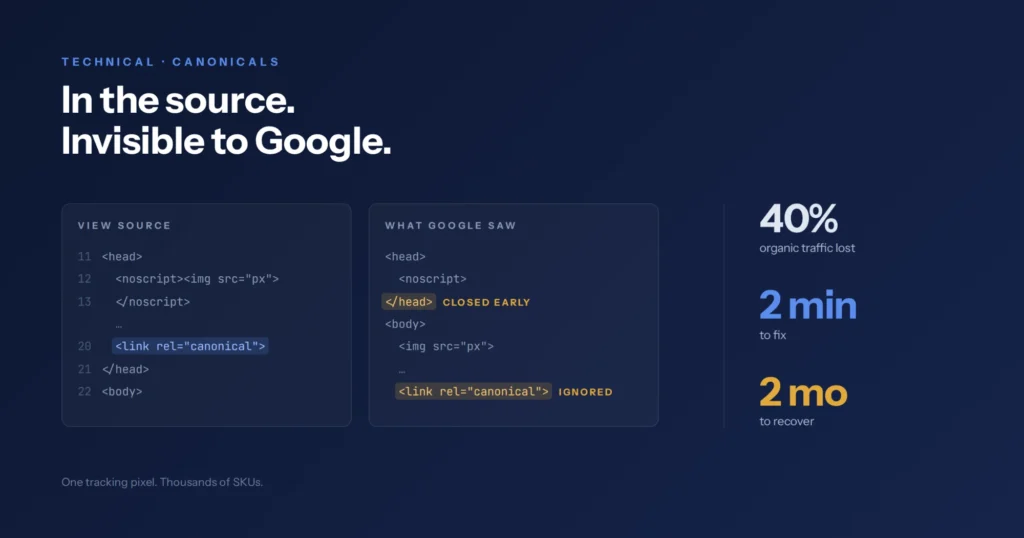
The nastiest canonical problem I’ve worked on was an inherited ecommerce build. A children’s store. Thousands of SKUs. Organic traffic dropped about 40% in just over a month.
Search Console flagged everything under Duplicate without user-selected canonical. URL Inspection showed User-declared canonical: None.
But the tag was there. Line 20 of the raw source. Clean.
The lightbulb went off when I stopped looking at view-source. I checked the rendered HTML in Search Console next to Chrome DevTools. The head was closing way too early. The canonical had been pushed into the body.
The culprit: a <noscript> tracking pixel hardcoded into the header.
A lot of people think the tag just had to be missing. It was closed fine. The real trap: an image tag has no business inside the head, noscript or not. When the parser hits it, it decides the head is over. It closes the head right there, starts the body, and kicks your canonical down into the dirt where Google ignores it. Google explains this in its guidance on valid page metadata.
The fix took two minutes. Delete the dead snippet. Flush the cache. The canonical stayed in the head, Search Console cleared the errors within two weeks, and organic traffic was back to baseline inside two months.
Two minutes to fix. Two months to recover.
Why a small tag can cost you big traffic
Most clients don’t know this. They don’t believe something that small can be a big issue.
I don’t argue. I open Search Console. It’s Google’s own data: the keywords, the traffic, the pages affected. That’s the evidence.
How to check your site for canonical problems in five minutes
You don’t need to touch code for this one.
In Search Console, go to Indexing → Pages. Scroll to “Why pages aren’t indexed.” Look for two statuses:
- Duplicate without user-selected canonical
- Duplicate, Google chose different canonical than user
If either lists pages that matter, like products, services or money pages, you have a problem worth looking at.
The five-minute check tells you there’s a problem. Fixing it is where I come in.
Six canonical mistakes I still see
- Treating a canonical as a command instead of a suggestion Google can ignore.
- Using a canonical when the page really needs a 301 redirect.
- Pointing page 2 and 3 back to page 1, which cuts off crawl depth to older content.
- Trusting view-source without checking whether a broken script pushed the canonical into the body.
- Sending mixed signals: canonical to one URL, while the old one stays in menus and sitemaps.
- Relying only on canonicals for filters on big stores, instead of blocking useless parameters.
How I diagnose a canonical problem
You rarely spot a canonical problem by looking at the site. It shows up as a dip. Rankings, traffic, or both. Usually both.
- Crawl with Screaming Frog to map the site structure.
- In Search Console, find keywords with more than one page ranking for them.
- Check average position over the full 16 months Search Console keeps. Find when it happened.
- Check whether Google released an update around that date. If not, keep digging.
- Check the tags and schema on the pages involved. Are there canonicals at all? Check the rendered HTML, not just the source.
- Decide: merge the pages, leave them, or add a canonical.
Canonicals don’t change how a site looks, so I usually fix them myself. A developer comes in when I can’t find where the code is being printed from.
What crawl tools miss
Crawlers tell you a tag is wrong. They don’t tell you what it’s costing you.
Search Console does. Which keywords dropped, which pages lost traffic, where two pages are competing for the same queries. Crawlers find the symptom. Search Console shows the damage.
Canonicals are structure, not a cleanup job
Most SEOs treat canonicals as something to fix after launch. I treat them as structure you plan before launch. Pages that don’t compete. Pages with a clear place.
Most sites aren’t planned that way. Especially ecommerce. The focus goes to product categories, and SEO gets bolted on after. That’s where the trouble starts.
The habit I give every client: keep a content sitemap and keep it updated. Not the XML sitemap on your site. A planning file with every page, its level, and its URL. New content gets placed so it covers what’s missing instead of competing with what’s there.
How I prioritise canonical fixes in an audit
I could list hundreds of issues on a big site. Only a few matter. I wrote about that in Your SEO Audit Found 150 Problems — Around 15 Are Real.
Most audits sort by count. I sort by what’s costing the owner money. Everything gets fixed, but the pages tied to revenue come first.
If Search Console is showing either of those duplicate statuses on pages that matter, start with the Kreametrix Audit. For the fix itself, see Technical SEO.