

Indexed on Google, unreadable to AI
I was testing live citations in Perplexity and ChatGPT Search. The content was live. Indexed. Search Console clean.
The AI tools kept hallucinating old details, or saying they couldn’t read the page.
This was my own site. The one that sells AI search optimisation.
What the refusal looked like
Not a timeout. A 403 with a “Checking your browser before accessing” JavaScript challenge page. Same 6,192 bytes every time.
It hit robots.txt too. That’s the part that compounds: a crawler that can’t read your robots.txt concludes the whole site disallows crawling.
What I checked, in order
robots.txt. Clean. Every AI crawler named and allowed.
WordPress. Nothing. No plugin block, nothing in .htaccess.
The origin directly. The identical request straight to the server returned 200.
That was the answer. Nothing on my server was blocking anything. The refusal was happening at the edge, before the request ever reached me.
The part I had wrong: it wasn’t about the bot’s name
I assumed a blocklist of AI user-agents. So I ran every agent I could think of against three URLs.
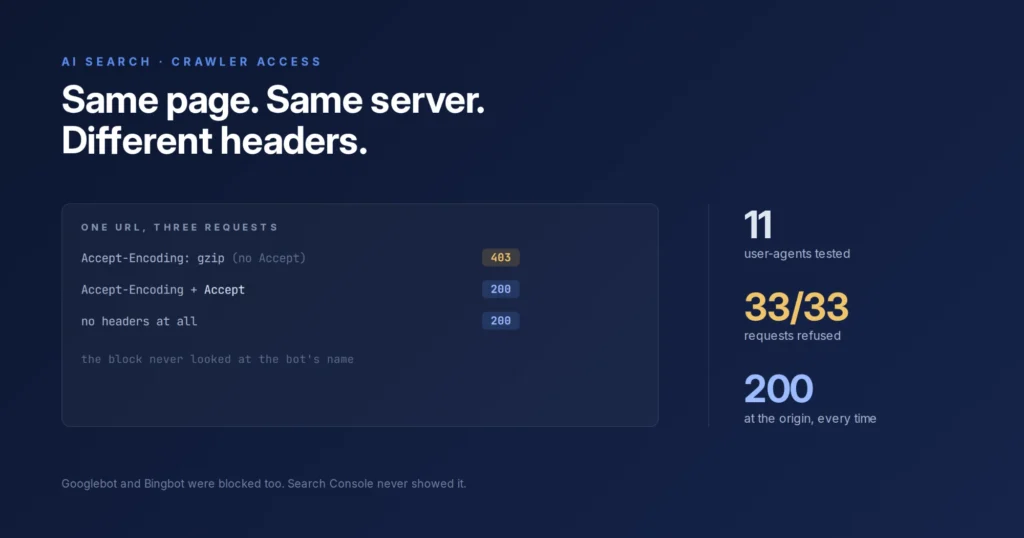
Eleven user-agents. Thirty-three requests. Every single one got the same 403 — GPTBot, ClaudeBot, PerplexityBot, and Googlebot and Bingbot right alongside them.
The trigger wasn’t the name. It was the headers.
| Request | Response |
|---|---|
Accept-Encoding alone | 403 |
Accept-Encoding + Accept | 200 |
| No headers at all | 200 |
That’s it. The rule challenges requests that look automated rather than browser-like, and it catches AI crawlers because a bare fetch is exactly what they send. Real Googlebot sends full browser-like headers, so it sails through. Facebook’s link-preview crawler too.
Which is why Search Console looked perfect the whole time.
There was a second, separate rule underneath: any user-agent containing “GPTBot” got a 429 with an empty body on my sitemap URLs, while every other agent got 200 on the same files. That one was bot-specific.
What the host said
Server-level filtering, not customer-configurable on my plan. Confirmed in writing.
Their support tested from inside their own network, reached a different edge node, and told me it was fixed. My tests through the edge node I was actually hitting still returned 403 on all 33 requests. “The dashboard says disabled” and “the edge stopped challenging” are different statements.
The fix: take back the edge
Turn off the host’s CDN, then route the domain through Cloudflare on the free plan. That moves the edge into my hands instead of a filter I can’t see, can’t change, and can’t confirm is off.
The settings that matter:
- AI crawlers: Allow. Cloudflare asks during onboarding and the default is to block. Say no.
- Managed robots.txt for AI bots: off. Let it manage robots.txt and it writes
Disallowrules for AI crawlers. You’ve rebuilt the problem somewhere new. - Bot Fight Mode: off. It challenges unknown agents, which is the whole category we’re trying to let in.
- SSL/TLS: Full (strict).
- DNS: only the root and
wwwproxied. Mail, DKIM, FTP, autoconfig and autodiscover stay DNS-only, or you break your email.
Then cache rules excluding wp-admin, wp-login and logged-in sessions, with an edge TTL matched to how often the site changes.
Two things to watch. Cloudflare overrode my max-age with its own, and it cached a 404 from before the switch and kept serving it until I purged everything. DNS took a couple of hours. Nothing broke.
I’ve now done this on three of my sites.
How I verified it
The same requests that had been refused, returning 200. Then the real test: Perplexity and ChatGPT fetching the live URL and quoting the actual text off the page.
The test that failed at the start, passing.
Why most owners never find this
Search Console reports Googlebot’s view and nothing else. Green checkmarks mean Google is happy. They say nothing about whether anything else can reach you.
And if the rule triggers on headers rather than names, there’s no blocklist to find. Nothing in your control panel mentions AI crawlers at all.
Does being blocked actually cost anything?
Both now and later.
Today you lose citations when people use Perplexity or ChatGPT as their search engine. Later it’s insurance: if the models can’t read your pages now, you won’t exist in their answers when it matters.
Some crawlers fetch a page to answer a live question. Others gather training data. The first decides whether you’re cited today. The second decides whether the model knows your brand exists at all.
Which AI crawlers should a service business allow?
All of them.
You aren’t a paywalled media site selling copyrighted articles. You need reach. You want the search bots citing you, and the training models knowing your brand exists.
Publishers have a real argument for blocking. A service business doesn’t.
What most SEOs get wrong about AI search
They think it’s schema markup and rewriting text to sound smart.
If the crawler can’t fetch your HTML, all that on-page work is useless.
Same failure as a canonical tag sitting in the source that Google never reads: The Canonical You Can’t See. Everyone checks the layer they can see. The problem is one layer below.
How I check AI crawler access
- Read robots.txt and confirm nothing disallows the AI crawlers.
- Request the site as each crawler, including robots.txt itself, and record the status codes.
- Request the origin directly. If the origin returns 200 and the public URL doesn’t, the block is at the edge, not on your server.
- Vary the headers. Same URL, same agent, with and without
Accept. If that flips the result, you’ve found a browser check, not a bot blocklist. - Test live retrieval in Perplexity and ChatGPT.
Step 3 tells you whose problem it is. Step 4 tells you what kind of rule you’re fighting.
The five-minute check, no terminal needed
Drop your service page link into Perplexity or ChatGPT and ask it to summarise the specific pricing and offers on that page.
If it says it can’t access the link, or invents the details, you’re likely blocked at the door.
One caveat: a made-up answer doesn’t always mean blocked. The tool may be answering from memory instead of fetching. The status-code test is what confirms it.
Where this fits in an audit
Crawler access is the first thing I check, because everything else depends on it. Start with the Kreametrix Audit for the diagnostic. For fixing access and building visibility from there, see AI search optimisation.